Explore the PHP2Shell vulnerabilities (CVE-2026-109618/109619), their risks, and how to effectively mitigate them in your organization.
Introduction to PHP2Shell and Its Relevance
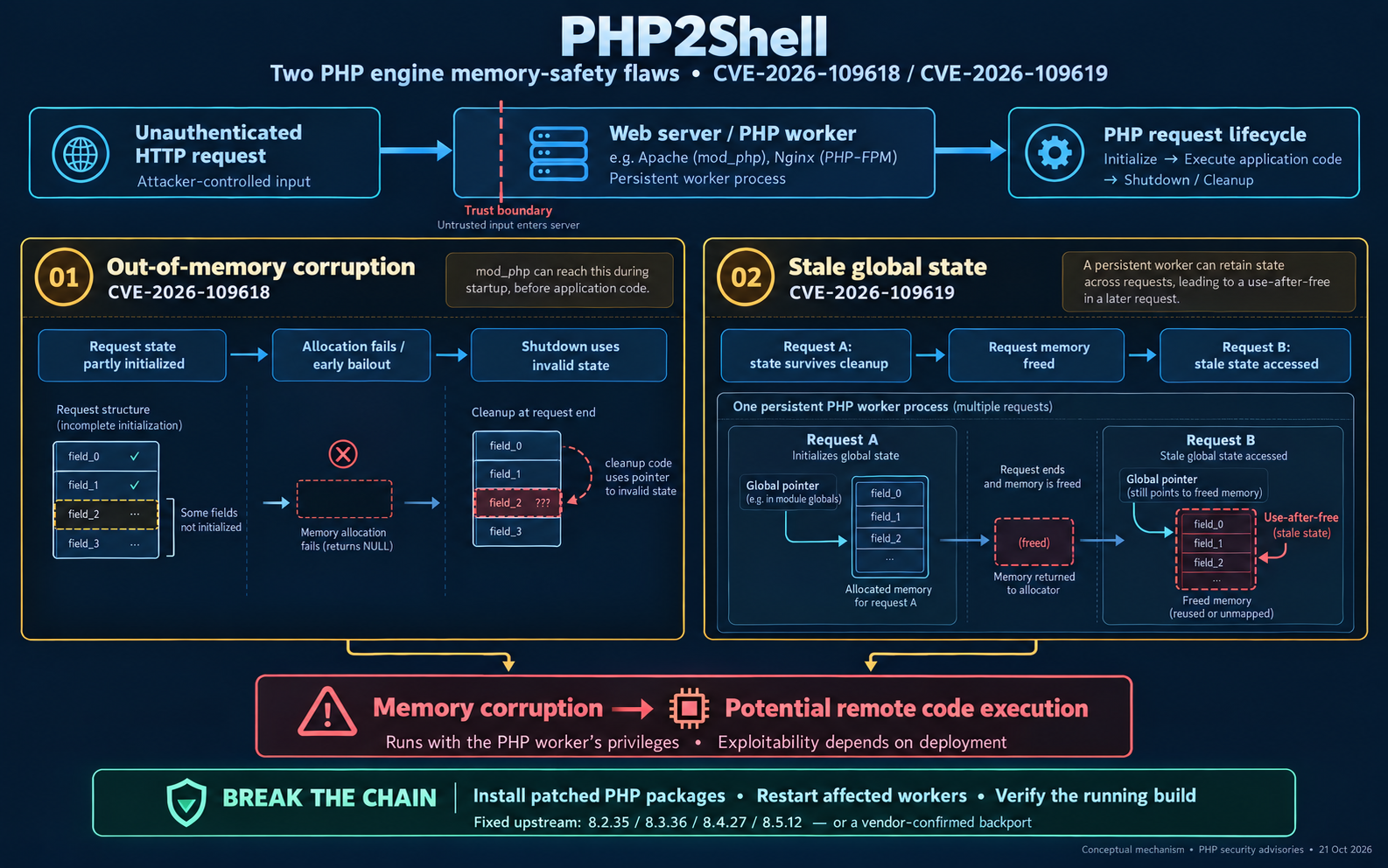
In the evolving landscape of web application security, vulnerabilities like PHP2Shell have emerged as significant threats. Identified by CVE-2026-109618 and CVE-2026-109619, these vulnerabilities enable remote code execution (RCE) flaws in PHP-based applications, allowing attackers to exploit weaknesses in web applications. Understanding these vulnerabilities is crucial for CISOs, IT security managers, and technology decision-makers to safeguard their organizations against potential attacks.
Understanding PHP2Shell Vulnerabilities (CVE-2026-109618/109619)
PHP2Shell vulnerabilities relate to web shells written in PHP, which can be exploited to gain unauthorized access to web servers. The specific CVEs highlight the risk of RCE, where attackers can execute arbitrary commands on a server. This exploitation can lead to devastating consequences, including data breaches and server takeovers.
The Mechanics of PHP2Shell Exploitation
The exploitation process typically involves the following steps:
- Vulnerability Identification: Attackers identify vulnerable PHP applications through scanning tools or manual testing.
- Payload Delivery: Malicious PHP scripts are uploaded to the server, often through unsecured file upload mechanisms.
- Remote Access: Once the web shell is on the server, attackers can execute commands, manipulate files, and potentially pivot to other systems within the network.
Understanding these mechanics is essential for developing effective defenses against such threats.
Risks of PHP2Shell Exploitation for Enterprises
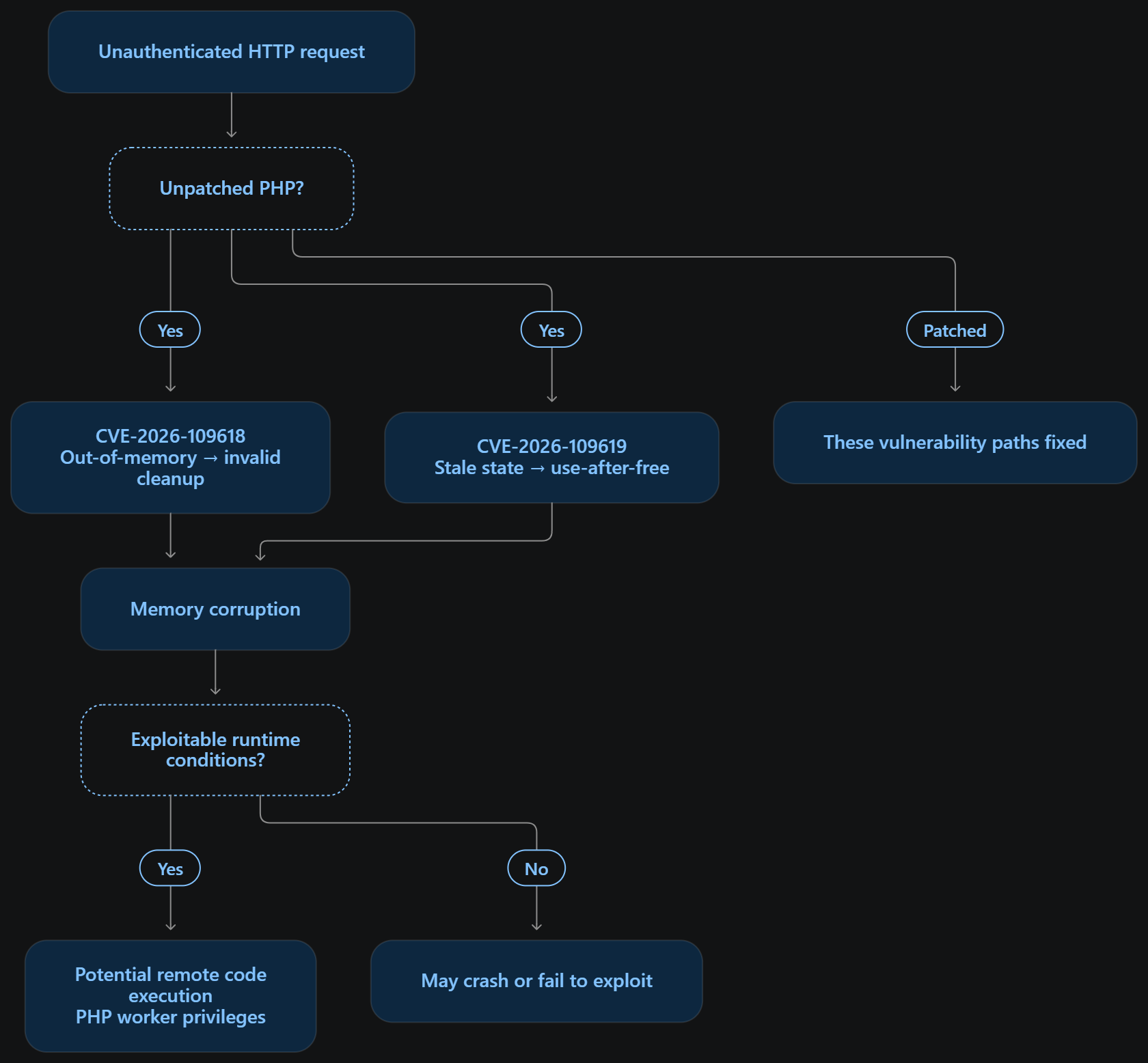
The risks associated with PHP2Shell exploitation are profound and can have far-reaching impacts:
- Unauthorized Access: Pre-authentication and engine-level, so no credentials are needed — exploitation grants code execution as the PHP process user, often enough to plant a persistent web shell.
- Data Breaches: CVE-2026-109619 also allows direct memory disclosure — passwords, API keys, and session tokens can be read straight from worker memory, even on applications with clean code, no shell required.
- Lateral Movement: Shared PHP-FPM pools or mod_php processes often serve multiple sites on one host, so compromising the engine compromises everything that process serves — a foothold attackers can pivot from to the rest of the network.
Mitigation Strategies and Best Practices
1. Run Regular Audits
- Inventory every environment running PHP — production, staging, shared hosting, internal tools.
- For environments you can reach over the network, run a version scan across the IP ranges you own.
- For each codebase, audit composer.json, .php-version, and Dockerfile for the pinned PHP version.
- Where SSH shell access exists, run a live check against the actual running binary — not just the file pins, since those can drift from reality.
- For shared hosting with no shell access, run the same audit over SFTP instead.
- Record the result (version, patched/vulnerable/unknown) per environment in one place.
- Repeat on a fixed schedule — weekly or monthly — not as a one-time exercise; a patched server today can drift out of date silently.
2. Upgrade PHP Versions
- Confirm the current version in each environment (from the audit step above).
- Identify the target patched version for that branch: 8.5.12, 8.4.27, 8.3.36, or 8.2.35 or later.
- For any branch at or below PHP 8.1, plan a major-version upgrade instead — there is no official patch for those branches.
- Review the exact upgrade commands for the environment's OS/package manager before running anything.
- Test the upgrade in staging first, including a smoke test of the application.
- Schedule a maintenance window for the production upgrade — expect a brief service interruption.
- Apply the upgrade and restart the PHP service (php-fpm, apache, or equivalent).
- Re-run the version check to confirm the upgrade actually took effect.
3. Implement a Web Application Firewall (WAF)
- Select a WAF suited to your stack (cloud-based, reverse-proxy, or module-based).
- Deploy it in front of the PHP application so all inbound requests pass through it first.
- Enable baseline rule sets for request anomalies (oversized bodies, malformed multipart uploads).
- Treat this as a secondary control — PHP's own advisory states no documented workaround closes every attack path, so don't rely on it alone.
- Pair it with the configuration-level mitigation (step 5 below) for additional coverage.
- Keep the PHP upgrade on the schedule regardless — the WAF buys time, it doesn't replace the fix.
4. Monitor Logs for Exploitation Attempts
- Confirm web server access logs and PHP-FPM/error logs are both enabled and centralized.
- Scan error logs for crash signatures — SIGSEGV, SIGBUS, out-of-memory, or worker-respawn events. Treat any match as direct evidence the engine's memory handling actually failed.
- Scan access logs for suspicious patterns: bursts of POST requests from one source in a short window, unusually large POST bodies, or HTTP 5xx responses immediately following a POST.
- Note that access logs don't capture POST body content, so they can't show the actual session.upload_progress payload — treat pattern matches as leads to investigate, not confirmation.
- Correlate timestamps between a suspicious access-log pattern and any nearby error-log crash entry.
- Escalate immediately on any confirmed crash signature; escalate with lower urgency on pattern-only matches pending investigation.
5. Apply the Documented Partial Mitigations as a Stop-Gap
- Locate the active php.ini for the environment (or .user.ini/.htaccess on shared hosting where php.ini isn't writable).
- Set session.upload_progress.enabled = 0 — this removes the one confirmed trigger path for CVE-2026-109619.
- Set memory_limit = -1 — this avoids one condition that can trigger the out-of-memory path in CVE-2026-109618.
- Save the file and restart the PHP service so the change takes effect.
- Verify the new values are active (e.g., via phpinfo() or ini_get()).
- Log this change as temporary and track it against the environment's scheduled upgrade — it reduces risk, it does not fix the underlying engine bug.
Utilizing Intelliroot’s Tools for Vulnerability Management
Intelliroot has a built a tool to help you find, audit, and remediate the PHP2Shell CVEs (CVE-2026-109618/109619) on your own infrastructure — network scan, SSH/SFTP checks, guided upgrades.
https://github.com/intelliroot-tech/php2shell
Conclusion
The risks posed by PHP2Shell vulnerabilities are significant, but with the right strategies and tools, organizations can protect their web applications from exploitation. As cyber threats continue to evolve, it is crucial for CISOs, IT security managers, and technology decision-makers to stay informed and proactive in their security efforts. To learn more about how Intelliroot can assist your organization in managing these vulnerabilities, contact us today.